
Keyboard Escape: +1 Speed ASMR
GoldointSimulation
3.427.00 Reviews
- Version
- 0.1.1
- Installs
- 5.00M
- Age Rating
- Everyone
Screenshots
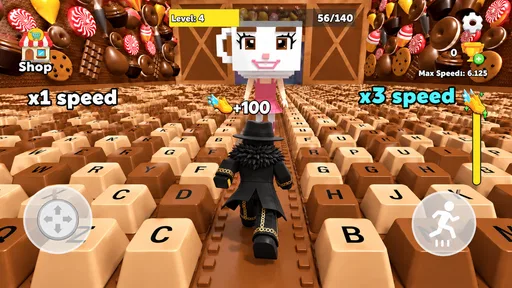
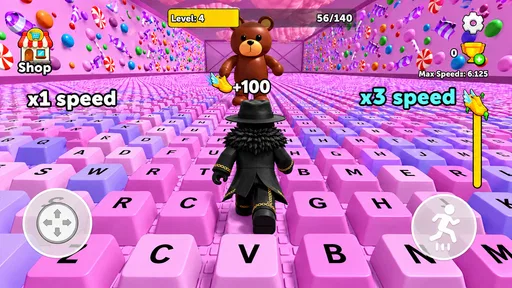
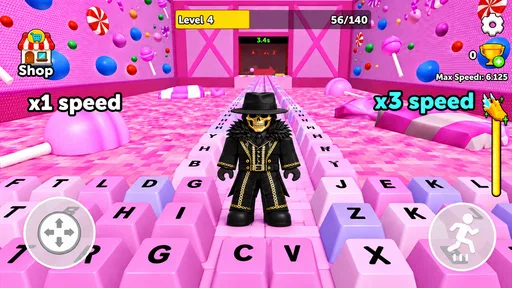
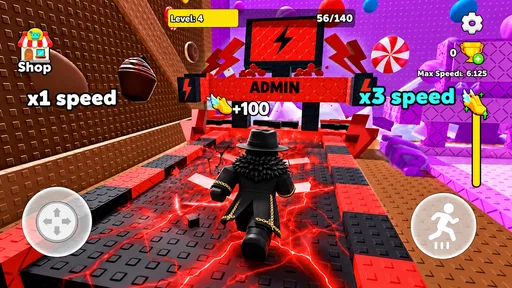
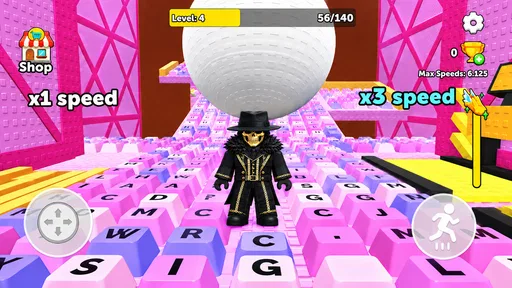
Our Review of Keyboard Escape: +1 Speed ASMR
 Analysis by Appyee
I like small games that give me something to do in the gaps between other things, and Keyboard Escape has a clear, unusual hook: its play is tied to keyboard imagery and ASMR-style sound, with speed building as you keep going. That makes it easy to understand at a glance, but the real question is whether the simple loop stays satisfying after the novelty wears off. My impression is that it works best as a short, focused reflex game rather than as a deep simulation to settle into for an evening.
Getting into a steady escape rhythm
The basic appeal is immediate: run, avoid trouble, and build speed through continued play. The keyboard theme gives the action a tactile identity that separates it from the many endless runners built around roads, tracks, or generic obstacles. Here, the idea of keys and their sounds is part of the mood, so I would approach it as a compact sensory challenge, not as a keyboard-typing lesson or a productivity tool.
In a typical quick session, I would focus on one thing at a time: keep the character moving safely, read what is ahead, and avoid letting the promise of extra speed distract me from the next obstacle. That sounds obvious, but it is a useful habit in games where progress encourages risk. A speed increase feels rewarding, yet it can also make careless reactions more costly. I found the most satisfying mindset is to treat speed as a result of consistent play, not as a target worth chasing at any price.
The sound is part of the draw, but it should support the run rather than become the whole task. If I am playing somewhere noisy, or while other people are nearby, I would pay more attention to the visual action and keep the session brief. In a quiet moment, the keyboard-inspired ASMR angle is more likely to feel intentional. This is a small but practical distinction: the game’s sound identity is a bonus when the setting suits it, not a reason to play with audio at all times.
That makes it a natural fit for waiting for a bus, taking a short break, or winding down between longer activities. I would not pick it when I want a story, a large set of goals, or a game that rewards careful planning over and over. Its strength is a direct loop that asks for attention in the moment. If you enjoy testing your reactions in short bursts, that simplicity can be refreshing; if you need a steady stream of new mechanics, it may feel thin.
What the keyboard theme adds
Many runners use familiar visual settings, so the keyboard concept gives this one a specific character. The pleasure is not just in moving forward; it is in the combination of quick decisions and a sound palette associated with keys. I would describe that as a mood-and-feedback choice rather than a complex simulation of typing. That distinction matters if you are considering it because of the name: the game is about escaping and gaining speed, not practicing a typing technique.
For a more enjoyable baseline, I would start with a short run and pay attention to how the visual cues and sound work together. Then I would try another run with the sound lower or off, if that suits the situation, and see whether the reflex challenge still carries the experience. This simple comparison helps answer a practical question before you invest much time: are you here for the sensory presentation, the action, or both? It is also a good way to avoid mistaking a quiet environment for a feature of the game itself.
Settings and habits worth checking
I would check the available settings before forming a firm opinion about comfort, especially audio and any control options the game presents. I do not assume a particular setting exists; the useful point is to inspect what is actually available on your device rather than expecting a specific layout. If the sound is too sharp during a longer session, lowering it or choosing a quieter environment can make the game easier to revisit. If controls feel awkward, a quick test run is better than pushing through and blaming the challenge.
A repeatable habit helps more than frantic tapping. I would settle into a comfortable grip, keep my attention on the upcoming path, and use brief sessions to learn the game’s visual rhythm. When a run ends, I would take a moment before restarting instead of immediately repeating the same rushed approach. That pause makes it easier to notice whether a mistake came from reacting late, looking away, or simply playing while distracted. It is a modest routine, but it turns a string of attempts into useful practice.
There is also a sensible way to handle the speed mechanic: let it accumulate naturally, then adjust your focus as the pace rises. Trying to force a high-speed run from the outset can make the early part feel like a race against your own impatience. If you are playing for relaxation, prioritize clean movement and the satisfying sound. If you are playing to challenge your reactions, treat each run as a chance to stay composed for longer. Those are different goals, and the game is more enjoyable when you choose one rather than switching between them mid-run.
For an everyday example, imagine you have a few minutes before a call. I would start one run with audio at a comfortable level, keep the phone steady, and focus on avoiding errors rather than trying to squeeze in a personal record. If the call begins, I would stop there rather than playing distracted. The game’s short-session appeal depends on attention; splitting that attention with messages or conversation is likely to make the run feel less fair and less satisfying.
Where it sits among simulation games
Although the store classifies it as a simulation game, I would not compare it with management or life simulations that build slowly through resource choices and long-term systems. Its moment-to-moment appeal is closer to a reflex runner, with the keyboard concept and ASMR presentation giving it a different wrapper. Compared with a conventional endless runner, it sounds more focused on a compact sensory hook; compared with a typing game, it is centered on movement and evasion rather than typing accuracy.
That comparison helps set expectations. If you normally enjoy games where you upgrade a base, manage a schedule, or make decisions that shape a world, this is likely too immediate for you. If you like quick arcade challenges but are tired of the usual scenery, the keyboard theme may be enough to make a familiar kind of reflex test feel distinct. I would choose a more substantial runner when I want varied environments and longer progression, and a typing trainer when I want practical keyboard practice. This game occupies a narrower, more playful middle ground.
Keyboard Escape: +1 Speed ASMR is free, and it is developed by Goldoint. It has an average rating of 3.4 from around 3.4 thousand ratings, with 27 written reviews and over 5 million installs. Those figures suggest that people have tried it in meaningful numbers, while the middling average is a reminder that its specific style will not land for everyone. I would read that as a reason to keep expectations measured, not as a verdict on whether its sound-and-speed loop will suit your taste.
Who will enjoy it, and who should pass
I think it is a good match for players who like brief reaction tests, appreciate sound as part of a game’s atmosphere, and do not need a large progression system to justify opening an app. It may also suit someone who wants a light alternative to scrolling during a spare moment, provided they can give the run their attention. The Everyone age rating makes it broadly accessible, though the best fit still depends on whether the fast, repetitive style sounds fun to you.
I would skip it if you want a quiet game that is designed around long-term planning, a robust simulation, or a clearly practical typing challenge. I would also be cautious if repetitive sound is irritating to you, or if you usually play in places where audio is inconvenient. You can still focus on the action, but the sound-led identity is a central part of the pitch, so someone who dislikes that kind of feedback may not get the same value from it.
One trade-off is that a simple loop puts extra pressure on the feel of each run. When movement and obstacle reading are satisfying, repetition becomes the point; when they are not, there may be little else to lean on. That is why I recommend trying it in short sessions rather than deciding after a long stretch. A quick test lets you judge the controls, pace, and sound without turning a small game into an obligation.
Version, compatibility, and the final call
The current version is 0.1.1, and it requires Android 8.1 or later. Those details are worth checking before installation, particularly if you are using an older device. I would also make sure the game feels comfortable on the screen you plan to use: reaction challenges are less enjoyable when your grip, visibility, or surroundings are working against you. The free price lowers the barrier to trying it, but it does not change the basic question of whether its narrow style matches what you want.
My overall take is that Keyboard Escape is best treated as a small, focused reflex game with a distinctive keyboard-and-sound identity. It is not the choice I would make for deep simulation, but it can be a pleasant short break when I want to concentrate, react, and enjoy a tactile audio theme. The most reliable way to get more from it is to play deliberately: check the settings that are available, choose a sensible audio level, and let speed build without sacrificing control.
If that sounds like your kind of quick challenge, I would give it a few short attempts and judge it on the feel of the action rather than expecting a sprawling game. If you would rather have varied objectives, meaningful long-term decisions, or typing skills you can use elsewhere, another option will serve you better. For the right player, though, the appeal is refreshingly direct: a few minutes of keyboard-flavored escape, with just enough speed pressure to make each run demand attention.
Privacy and Permissions
See what permissions an app requests and how it handles your data.
- Wi-Fi connection information
- view Wi-Fi connections
- Other
- view network connections, full network access, control vibration, prevent device from sleeping, Google Play license check
Verdict
Strengths of Keyboard Escape: +1 Speed ASMR
- The escape-room concept adds a clear goal to quick typing challenges.
- Short rounds make it easy to play during brief breaks.
- Increasing speed creates a steady sense of challenge.
- ASMR-style audio gives the gameplay a distinctive feel.
- Simple controls make the basic mechanics easy to pick up.
Limitations of Keyboard Escape: +1 Speed ASMR
- Rising speed may make later stages frustrating for some players.
- The core typing mechanic may feel repetitive over time.
- ASMR audio may not appeal to every player.
- Fast play can be difficult on smaller touchscreens.
- The game may offer limited variety between rounds.
Similar Picks in This Category
View All
Truckers of Europe 3
Wanda Software4.3

Town Building Life Simulator
XGame Global4.2

Fidget Toys Trading・Pop It 3D
Freeplay Inc4.7

Sculpt People
CrazyLabs LTD4.4

Scary Teacher 3D
Z & K Games4.2

Hair Tattoo: Barber Shop Game
CASUAL AZUR GAMES4.3
Frequently Asked Questions
What is Keyboard Escape: +1 Speed ASMR?
Keyboard Escape: +1 Speed ASMR is a casual game built around tapping keyboard-style keys to move through escape challenges. Its title suggests a simple loop in which each tap increases speed, while ASMR-style sound effects add a tactile, satisfying feel. The exact levels and mechanics may vary by version, so check the current store listing and in-game instructions before downloading.
How do you play Keyboard Escape: +1 Speed ASMR?
The game appears designed for straightforward touch controls: tap the on-screen keyboard keys to build speed and progress through an escape-style challenge. This makes it approachable for short play sessions and players who prefer games without complicated controls. Pay attention to the tutorial and prompts in your version, because they explain how speed works and whether a level requires timing, collecting items, or avoiding obstacles.
Is Keyboard Escape: +1 Speed ASMR suitable for children?
Its keyboard-tapping concept and simple controls may make the game easy for younger players to understand, but suitability depends on the content, advertisements, and in-app purchase options in the version available in your region. Adults should review the age rating and store information before allowing a child to play. If the game includes ads or purchases, consider using device-level parental controls.
Does Keyboard Escape: +1 Speed ASMR require an internet connection?
Whether the game works offline can depend on its current release and how it handles advertisements, rewards, or other online features. Basic gameplay may be available without a connection, but some functions could require internet access. Check the app’s store description and test it in airplane mode after installation if offline play matters to you. Avoid assuming every feature will work without a connection.
Is Keyboard Escape: +1 Speed ASMR free, and does it contain ads or purchases?
The price and monetization can differ between Android and iOS, as well as by country and update. Check the listing for the current download price, in-app purchases, and advertising disclosures before installing. Even when a game is free to download, ads or optional purchases may be included. Review purchase settings on your device, especially if children might play, to help prevent accidental spending.
Play our best games!


